
Top-Rated QuickBooks Integration

2-Way Sync
24-hours, 7 days per week with QuickBooks
Top-Rated
By bookkeepers in the
QuickBooks App Store
Every Detail
Down to the line item, class, and location.
Reduce human error, improve security, and reclaim considerable staff time from manual data entry with Novi's unparalleled integration.
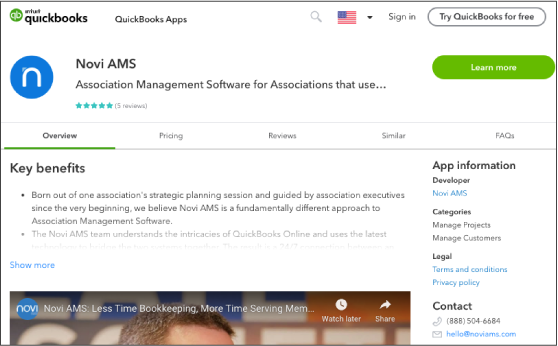
The only AMS in the QuickBooks Online app store.
"The QuickBooks Online Integration is a game changer - there is nothing else like it!"
Chip Tatum, AAGO
Designed by a QuickBooks
Advanced Certified ProAdvisor
The instant a record is created in Novi AMS, that data is synced to your QuickBooks Online account. Multiple times per day, Novi AMS reaches out through the QuickBooks Online API to sync your financial data back to Novi AMS. The result is a more seamless experience for your staff and your members.

Unparalleled Detail
Transactions in one platform are seamlessly synced to the other.
Bookkeepers rave about the simplicity, and CPAs have praised the transparency.
- Members (Customers)
- Invoices
- Credit Memos
- Payments
- Sales Receipts
- Items
- Tax Rates
- Classes
- Departments
- Chart of Accounts
Approved by Intuit for the QuickBooks App store
The only AMS approved by Intuit for the QuickBooks App store, Novi submits to a rigorous annual security & technical review to keep your data safe.

"I can manage my books instead of being managed by them!"
Brenda Thompson, FMEA
Connecting to QuickBooks
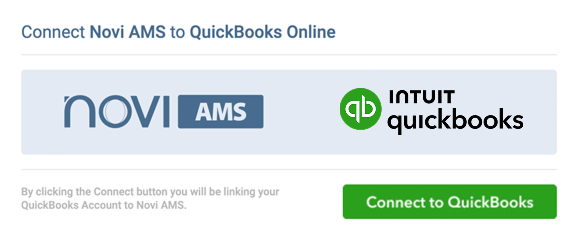
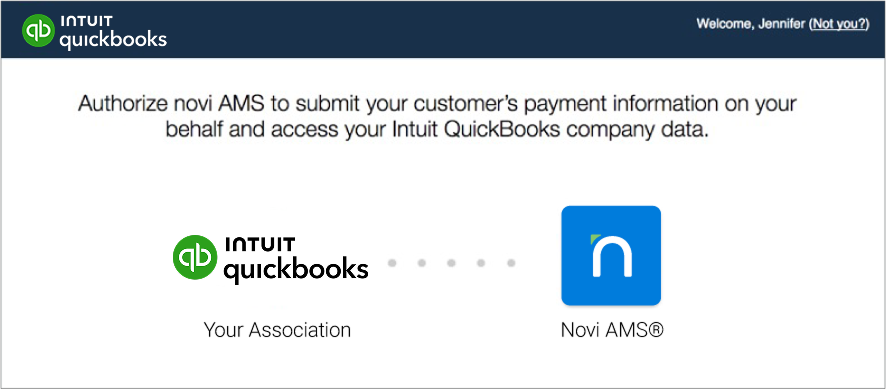
During onboarding, we'll help you connect your Novi AMS database to your QuickBooks Online account in a simple, 4-step process:
- Log in to Novi AMS.
- Click "Connect to QuickBooks."
- Select the QuickBooks account that you would like to sync.
- Press "Authorize" to confirm.
There are no files to download, date ranges to remember, or journal entries to manage. Your Novi AMS data will simply appear in QuickBooks as if you had manually entered it yourself. The only difference is that it will be completely automated.

"I generally don’t trust software, but I trust Novi."
Dominica Hurst, Accounting Help 4 You & QuickBooks Advanced Certified ProAdvisor
QuickBooks Certified Pro-Advisors on Staff
When an accounting question bridges your AMS and QuickBooks, the Novi support team has your back.
Many of us are QuickBooks Certified ProAdvisors, so rest assured that you'll have quick and comprehensive assistance.
Novi AMS integrates directly with QuickBooks Online and is the only association management software approved by Intuit for the QuickBooks App Store. The integration was architected by a QuickBooks Advanced Certified ProAdvisor and tested by association bookkeepers and accountants, and Novi completes an annual security and technical review with Intuit to keep its approval. Its two-way integration records membership dues, event registrations and ecommerce purchases in QuickBooks Online with line-item detail, so associations don't rely on manual entry or journal entries.
Intuit is phasing out QuickBooks Desktop and recommends that customers move to QuickBooks Online, where they can connect to a wide range of apps, including association management software. Novi AMS works with QuickBooks Online rather than Desktop, because its real-time integration depends on the QuickBooks Online API. It works with every QuickBooks Online plan except Self-Employed, and QuickBooks Online Plus or Advanced is recommended because class tracking helps associations report revenue by program. Associations still on QuickBooks Desktop move to QuickBooks Online first and then connect Novi during onboarding.
The most reliable approach is an integration that records each transaction in QuickBooks Online first, so there is never a second set of books to reconcile. Novi AMS writes each new transaction to QuickBooks Online the moment it is created, before saving it in Novi, so the two systems stay in agreement. Changes made in QuickBooks Online, such as a check payment entered by a bookkeeper, flow back to Novi within minutes. Novi also runs scheduled syncs several times a day and a full sync every week to confirm that everything matches.
Detailed transactions are better, because summary journal entries hide which member paid for what and make product and class reporting hard to rebuild. Novi AMS syncs customers, invoices, credit memos, payments, sales receipts, products and services, tax rates, classes, departments and chart of accounts information with QuickBooks Online. That detail lets bookkeepers run QuickBooks reports, such as sales by product, without rebuilding data. Each transaction appears in QuickBooks as if staff had entered it by hand.
Connecting Novi AMS to QuickBooks Online is quick. It takes four steps, and Novi's onboarding team helps each association complete them:
- Log in to Novi AMS.
- Click "Connect to QuickBooks."
- Select the QuickBooks Online account to sync.
- Click "Authorize" to confirm the connection.
There are no files to download, date ranges to remember or journal entries to manage. Novi's support team includes QuickBooks Certified ProAdvisors who answer questions that span both systems.
Top-Rated. Detailed. Automated.
Chat with one of our QuickBooks Certified ProAdvisors.